
How to Avoid Warping in Seedance 2.5 AI Videos
Reduce warped faces, hands, products, and backgrounds in Seedance 2.5 with a simpler source, one motion, and a practical review pass.

Warping in a Seedance 2.5 video usually begins before the final frame: the source is crowded, the prompt asks for too many changes, or the motion gives the model no stable anchor. The fastest fix is rarely a longer negative prompt. Start with a clean reference, one subject, one action, and one camera instruction in the Seedance 2.5 video generator, then diagnose the specific failure in the output.
Last updated: July 15, 2026 - about 7 min read
Identify the type of warping first
"Warping" describes several different errors, and each needs a different response. A face that changes identity, a hand that loses structure, a product edge that bends, and a background that melts are not the same problem.
| Failure | Likely pressure point | First correction |
|---|---|---|
| Face changes or drifts | Too much action, weak portrait reference | Use a clearer portrait and reduce movement |
| Hands or limbs deform | Occlusion, fast gestures, tight crop | Choose a simpler pose or frame wider |
| Product bends or changes shape | Reflective detail, busy background, rotation | Use a cleaner packshot and a slow camera move |
| Background stretches | Competing movement or a complex scene | Lock the camera and remove extra actions |
| Text becomes unreadable | Text was left to generation | Add text later in an editor |
This diagnosis matters because "make it more realistic" does not tell a model which constraint is important. A simple, specific correction does.
Start with a reference that gives the model room
Use an image with one clear subject, enough light, visible edges, and space around the person or object. A side profile under a hat, a hand covering the face, a glossy product against a glittering background, or a crowd scene creates ambiguity before motion begins.
For a product test, clean background and stable silhouette beat dramatic styling. For a person, choose a fully clothed image with the face and limbs visible. Then give the model one action. A slow head turn, a modest fabric movement, or a light sweep is easier to keep coherent than running, camera spinning, weather effects, and a scene transformation in the same clip.
Use a prompt that protects the important parts
Name the elements that must stay fixed before naming the movement:
Use the uploaded image as the reference. Keep the subject's identity, face, fully clothed outfit, product shape, lighting, and background stable. Create one small action: a slow turn toward camera. Use a fixed camera and natural motion. Avoid fast gestures, scene changes, readable text, logos, and new objects. End on a clean frame.
If the first render still bends the product or shifts the face, remove more motion. Do not add six conflicting instructions. A reliable realistic AI video often has less happening in it, not more.
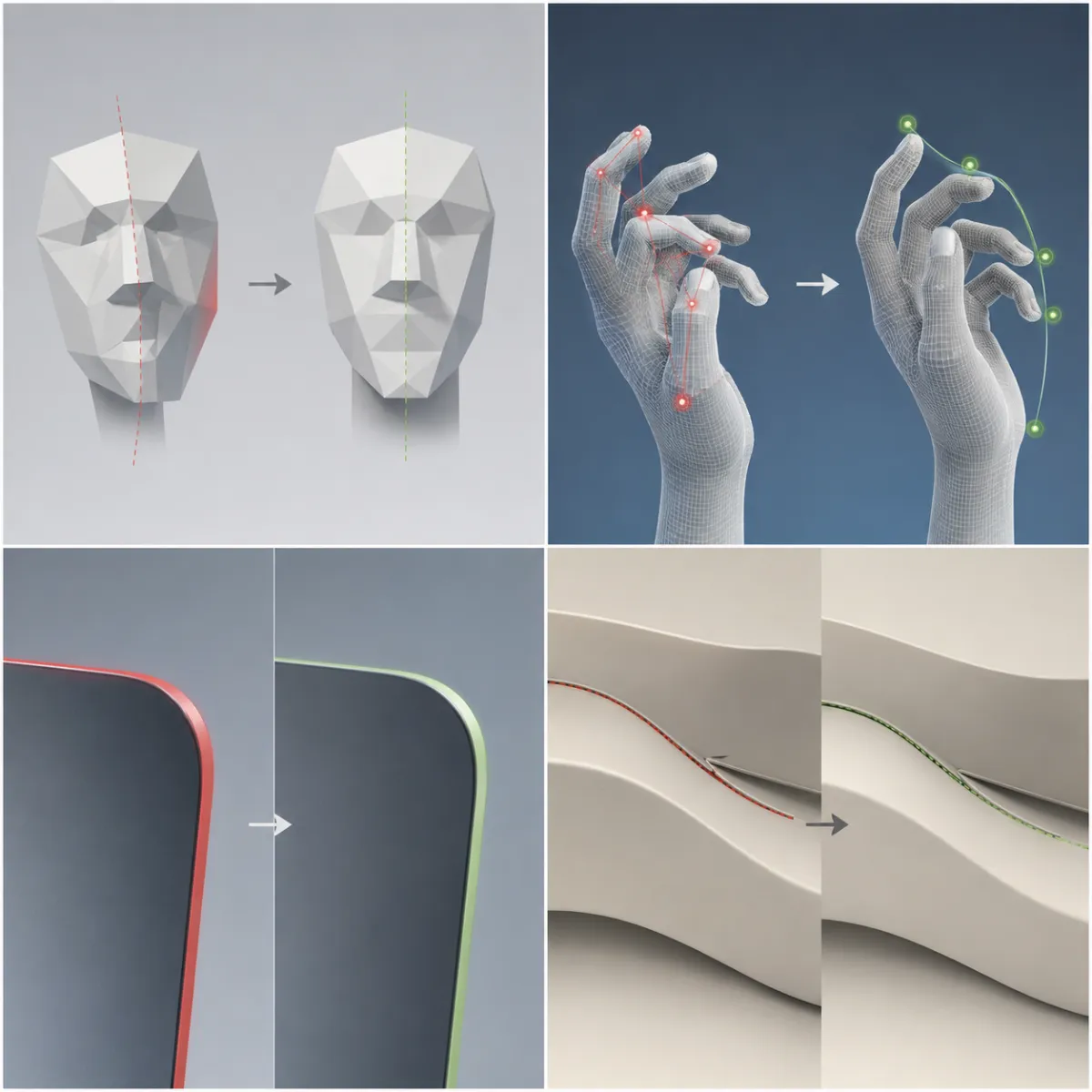
This AI-generated diagnostic board is a planning visual. Unlike the cover's stable scene, it helps identify the specific artifact and the smallest corrective test.
Review in two passes
On the first pass, watch at normal speed and decide whether the clip tells the intended visual story. On the second, pause at the beginning, middle, and end. Check the face or product, hands, edges, background, and ending frame. If one area breaks, change only the condition related to that area on the next run.
For example, if the product edge bends during a camera arc, keep the source but switch to a locked frame with a light sweep. If hands break during a gesture, choose a reference with the hands relaxed or out of frame. This method produces evidence about what changed rather than a pile of random variations.
For broader prompt structure, see Seedance 2.5 text-to-video prompt guide and Seedance camera movement prompts. You can also compare a more deliberate production workflow in what makes Seedance 2.5 different.
Limits you should keep in the workflow
Some clips will fail even with a careful source and prompt. Generative video is probabilistic, and complex hand contact, fast choreography, reflections, small text, and multi-person interactions remain difficult. Treat generation as a test-and-select process. Do not use it to create claims, readable prices, or evidence that needs to be exact.
Use only sources you have permission to use, and check the current platform terms before commercial publishing.
Frequently asked questions
Why do Seedance videos warp?
Warping often appears when a source image is ambiguous or the generation asks for too many simultaneous changes. Faces, hands, products, and backgrounds each fail for different reasons, so diagnose the broken area before changing the next prompt.
Do negative prompts stop warping?
They may help in some workflows, but they are not a substitute for a clean source and a simple motion request. Start by protecting the key subject and reducing conflicting actions.
What is the best way to make a realistic AI video?
Use a clear source, one stable subject, one action, and a controlled camera. Review the output in detail, then change one variable on the next test.
Simplify the next render instead of fighting the broken one
Open Seedance 2.5, make one stable motion test, and use the diagnostic pass to decide the smallest correction for the next version.